
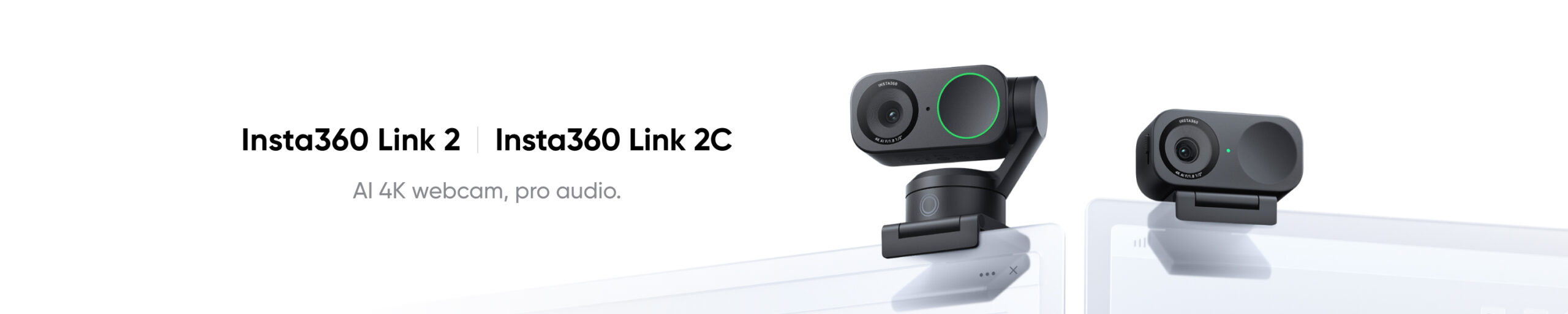
A webcam does not need to move just because it can.
That is the most useful thing to understand before shopping for an Insta360 webcam on Cyber Monday 2026.
Insta360 now sells two distinct webcam designs at two performance levels.
There are motorized Link models that physically follow you around the room.
There are smaller Link 2C models that stay fixed on the monitor and use intelligent framing instead.
And for 2026, Insta360 has added a new Pro tier with a substantially larger sensor and improved microphones for people who care about low-light image quality, presentations, streaming, podcasting, and professional calls.
So before comparing sale prices, ask one question:
Do you sit at your desk, or do you move around it?
That answer immediately eliminates half the lineup.
Cyber Monday 2026 pricing has not been announced yet. CRAOB will update this page when confirmed offers become available.
Insta360’s webcam lineup for 2026
The current Link family breaks down like this:
| Webcam | Position | Camera movement | Best for |
|---|---|---|---|
| Link 2C | Mainstream/value | Fixed | Desk calls, streaming, compact setups |
| Link 2 | Mainstream tracking | Motorized 2-axis gimbal | Presenters, teachers, standing creators |
| Link 2C Pro | Premium fixed | Fixed | Better image/audio quality at a desk |
| Link 2 Pro | Premium tracking | Motorized 2-axis gimbal | Professional presentations and streaming |
| Original Link | Older generation | Motorized | Clearance only if heavily discounted |
The Link 2 and Link 2C generation dates to 2024, while Link 2 Pro and Link 2C Pro are the newer 2026 Pro family. Insta360’s current hardware documentation lists all five Link generations together, including the original 2022 Link.
That creates a much more useful Cyber Monday strategy than simply buying whichever webcam carries the word “Pro.”
Your desk is small and you mostly sit still: start with Link 2C
For ordinary home-office use, Insta360 Link 2C may be all the webcam you need.
It uses a fixed compact body rather than a motorized gimbal but still provides:
- up to 4K video;
- 1/2-inch sensor;
- autofocus;
- HDR;
- AI auto framing;
- AI noise reduction;
- Natural Bokeh;
- gesture control;
- DeskView;
- Smart Whiteboard modes.
Insta360 lists Link 2C at just 46.5g without its magnetic mount, considerably lighter and smaller than Link 2.
Insta360 Link 2C 4K AI Webcam — Check Price on Amazon
Link 2C makes sense if:
- you remain seated during calls;
- your camera is centered above the monitor;
- you mainly use Zoom, Teams, Google Meet, or Webex;
- you want 4K without paying for motorized tracking;
- desk space is limited;
- you want a cleaner, simpler webcam.
Insta360 lists compatibility with major conferencing platforms including Zoom, Microsoft Teams, Google Meet, Cisco Webex, and with streaming software such as OBS and Twitch.
For a normal desk worker, the cheaper fixed webcam may be a more rational purchase than a motorized camera whose biggest feature rarely gets used.
Your webcam needs to follow you: Link 2
The Insta360 Link 2 uses a motorized two-axis gimbal.
Instead of merely cropping digitally around you, it can physically pan and tilt as you move.
Insta360 specifies approximately ±141° yaw and ±90° pitch movement.
Insta360 Link 2 4K AI Webcam — Check Price on Amazon
That hardware makes much more sense for:
- teachers;
- fitness instructors;
- standing presentations;
- whiteboard demonstrations;
- livestreamers who move around;
- cooking demonstrations;
- product presentations.
If you frequently stand up during a meeting and walk over to a whiteboard, motorized tracking can be genuinely useful.
If you never leave your chair, it may simply be extra hardware.
Link 2 vs. Link 2C: don’t pay for a gimbal you don’t use
This is the easiest comparison in the lineup.
Both standard-generation cameras use a 1/2-inch sensor and offer 4K imaging.
The major physical difference is tracking.
Choose Link 2 if:
You move.
Choose Link 2C if:
The camera stays pointed toward one chair.
Insta360 describes Link 2 as using AI tracking through its two-axis gimbal, while Link 2C uses Auto Framing from a fixed camera position.
A Cyber Monday discount can make Link 2 tempting, but buying motorized tracking simply because the prices become close is unnecessary unless your workflow benefits from it.
The major 2026 upgrade: Link 2 Pro and Link 2C Pro
The new Pro generation changes image quality more substantially than simply adding another AI feature.
Both Pro webcams use a 1/1.3-inch sensor, compared with the 1/2-inch sensor in Link 2 and Link 2C.
Insta360 says the new sensor provides 2.23 times the photosensitive area of Link 2 and uses 2.4μm equivalent pixels.
That matters most when lighting is not ideal.
A larger sensor can capture more light, helping with:
- dim offices;
- evening calls;
- rooms lit mainly by monitors;
- streaming without a large studio-light setup;
- better highlight and shadow handling.
The Pro models also add Dual Native ISO and HDR for challenging lighting conditions.
Your room is dark or backlit: Pro becomes easier to justify
Webcam resolution is often overemphasized.
A cheap camera can say “4K” on the box and still look poor in bad light.
For video calls, sensor size and lighting can matter more than the resolution number itself.
Both Link 2 and Link 2 Pro can output 4K.
The bigger reason to move from Link 2 to Link 2 Pro is the larger 1/1.3-inch sensor and improved image pipeline, not another jump in nominal resolution.
If your office has:
- a bright window behind you;
- weak overhead lighting;
- evening calls;
- dramatic streaming lighting;
- uneven light across your face;
the Pro model has a more meaningful reason to exist.
You want Pro image quality but never leave the chair: Link 2C Pro
This may be one of the most rational products in Insta360’s new range.
Link 2C Pro uses the same 1/1.3-inch sensor, Dual Native ISO, F1.9 aperture, autofocus, dual microphones, HDR, and 4K30 capability as Link 2 Pro.
What it leaves out is the motorized gimbal.
Insta360 Link 2C Pro 4K AI Webcam — Check Price on Amazon
That makes it particularly interesting for:
- executives;
- remote workers;
- podcasters;
- seated streamers;
- consultants;
- customer calls;
- interviews;
- creators recording at a fixed desk.
You get the key Pro imaging upgrade without paying for tracking hardware you may never need.
You move and want the best Link webcam: Link 2 Pro
The Link 2 Pro combines the Pro camera system with Insta360’s motorized gimbal.
Insta360 Link 2 Pro 4K AI Webcam — Check Price on Amazon
Its headline features include:
- 1/1.3-inch sensor;
- 4K30;
- 1080p60;
- F1.9 aperture;
- Dual Native ISO;
- HDR;
- phase-detection autofocus;
- AI tracking;
- dual microphones;
- directional pickup;
- beamforming;
- AI noise cancellation;
- Stream Deck compatibility.
For a seated Zoom call, this can be excessive.
For somebody teaching a class from a standing desk, presenting products, moving between a desk and whiteboard, or running a professional livestream, the additional tracking capability can be genuinely useful.
Pro does not mean higher than 4K30
This is worth making clear.
Both Link 2 Pro and Link 2C Pro top out at:
4K30
or
1080p60.
The Pro upgrade is therefore about:
- sensor size;
- dynamic range;
- low-light performance;
- audio;
- processing;
- workflow integration.
It is not about moving from 4K to 6K or 8K.
Insta360 explicitly lists 4K30 as the maximum supported resolution and 1080p60 as the maximum frame rate on the Pro models.
For webcam use, that is sensible.
Most conferencing platforms do not transmit 4K at full quality anyway.
4K webcam does not mean your Zoom meeting is actually 4K
This is an important Cyber Monday reality check.
A 4K webcam provides a better source image.
That can improve:
- cropping;
- auto framing;
- recording;
- streaming;
- local capture;
- image processing.
But conferencing platforms can impose their own resolution and bandwidth limits.
Insta360 specifically notes that platform limitations may affect delivered video resolution.
Therefore, do not buy Link 2 Pro purely because coworkers will supposedly receive native 4K Zoom video.
Buy it for the quality of the camera feeding the software.
Audio gets a real upgrade on the Pro generation
Webcam buyers often spend all their attention on picture quality and forget that colleagues listen to them for hours.
The Pro generation adds a dual-microphone system combining omnidirectional and directional pickup.
Insta360 also adds:
- AI noise cancellation;
- beamforming;
- Standard mode;
- Wide mode;
- Focus mode;
- Original mode.
This is a meaningful improvement over the standard Link 2 generation’s single-mic approach.
For a simple home office in a quiet room, the standard webcam microphone may already be adequate.
For:
- noisy apartments;
- shared offices;
- podcasting;
- presentations;
- rooms with fans or air conditioning;
the Pro audio system becomes more useful.
But a separate microphone can still be better
Do not assume a premium webcam eliminates the need for dedicated audio.
If your work includes:
- professional podcasting;
- voice-over;
- YouTube production;
- paid webinars;
- music;
- serious livestreaming;
a dedicated microphone can still provide much more control over placement and sound quality.
CRAOB’s DJI Mic Cyber Monday 2026 Deals and Audio-Technica Microphone Cyber Monday 2026 Deals guides are natural next stops for a more complete creator setup.
For normal meetings, however, the Pro webcam’s upgraded microphones may let you avoid additional desk hardware.
Natural Bokeh vs. software blur
The Link 2 families support background effects including Natural Bokeh and software-based background options.
The Pro’s larger sensor makes this feature more interesting because the camera has more imaging headroom to work with.
Insta360 describes Natural Bokeh as recognizing the person in frame and adjusting depth-of-field presentation while keeping the subject sharp.
This can look more polished than the crude edge detection associated with older virtual-background tools.
But background blur should not be the sole reason to pay for Pro.
Good lighting and a clean physical background can make a larger difference than any software effect.
You teach or present: Smart Whiteboard matters
Insta360’s Link cameras are particularly well suited to teaching because their software includes specialized modes beyond simply showing a face.
The original Link introduced modes such as:
- Whiteboard Mode;
- DeskView;
- Portrait Mode;
- Overhead Mode.
The newer Link generations continue to build around that presentation concept.
A teacher can therefore move between:
face
whiteboard
desk/document
without building a complicated multi-camera setup.
This is one of the strongest reasons to choose motorized Link 2 or Link 2 Pro rather than a generic fixed webcam.
Link 2 Pro is the better standing-presenter camera
Imagine a lecturer who:
starts at the desk, walks to the board, returns to the laptop, then holds up an object.
A fixed webcam can digitally crop to compensate.
A gimbal camera can physically follow the subject.
That is where Link 2 Pro’s AI tracking earns its price.
If the camera never needs to change direction, Link 2C Pro is more efficient.
The correct comparison is therefore not:
Pro vs. non-Pro
first.
It is:
moving vs. fixed
first.
Then:
standard vs. Pro image quality.
Your priority is Twitch or YouTube streaming
For conventional seated gaming streams, start by comparing:
Link 2C
and
Link 2C Pro.
The fixed form factor is often completely sufficient when you remain in a gaming chair.
Move to Link 2 or Link 2 Pro when:
- you stand;
- stream fitness;
- demonstrate products;
- film multiple parts of a room;
- perform;
- frequently shift position.
Insta360 recommends Link 2 Pro for higher-end 2026 streaming setups, citing its larger sensor, low-light performance, AI tracking and improved microphones.
Stream Deck integration is more useful than another AI gimmick
One of the stronger 2026 workflow improvements is Insta360’s official integration with Elgato Stream Deck.
The integration can control functions such as:
- gimbal pan/tilt/zoom;
- AI tracking;
- framing modes;
- scene presets;
- exposure;
- white balance;
- brightness.
It can also help manage multiple Link cameras in more complex creator setups.
This matters for professional streams and teaching because changing camera behavior no longer requires constantly opening the Link Controller software.
For a basic Zoom user, it is unnecessary.
Multi-camera creators should look closely at Pro
A single webcam is enough for almost everyone.
But podcasts, courses, product demonstrations, and live productions can benefit from multiple angles.
Insta360 says its Stream Deck integration can control multiple compatible Link cameras simultaneously.
For example:
Camera 1: host.
Camera 2: product/table.
Camera 3: wider room shot.
This begins to move the webcam from a meeting accessory into a compact production camera.
That is one of the few use cases where buying several premium webcams can make sense.
DeskView can replace a second camera for simple demonstrations
Before buying two webcams, try DeskView.
For paperwork, sketching, handwriting, keyboards, electronics, and basic product demonstrations, Insta360’s software can transform the camera view toward the desk.
That can be far simpler than adding another camera and capture device.
For frequent professional overhead recording, however, a dedicated top-down camera may still offer better composition and reliability.
Privacy differs between the gimbal and fixed Pro webcams
Privacy behavior is another practical difference.
On Link 2 Pro, the gimbal can tilt the camera downward into its privacy/sleep position.
On Link 2C Pro, Insta360 provides a physical privacy switch that blocks the lens.
Some users may actually prefer the obvious physical shutter of Link 2C Pro.
You can visually confirm that the lens is covered.
This is a small specification that can matter every single workday.
Original Insta360 Link: Cyber Monday clearance only
The original Insta360 Link launched in August 2022.
It was impressive for its time, with:
- 4K30;
- 1/2-inch sensor;
- AI tracking;
- motorized gimbal;
- gesture control;
- Whiteboard Mode;
- DeskView;
- Overhead Mode.
Original Insta360 Link 4K Webcam — Check Price on Amazon
By Cyber Monday 2026, however, it should not be one of CRAOB’s primary recommendations.
There are now two newer generations above it.
Treat the original Link as a clearance target only.
It can make sense when the price is dramatically below Link 2.
Do not pay modern Link 2 money for old inventory.
Link 2 becomes particularly interesting now that Pro exists
The arrival of Link 2 Pro does not make Link 2 a bad webcam.
Quite the opposite.
Cyber Monday can turn previous-generation premium hardware into a much stronger value.
Link 2 already gives you:
- 4K;
- large-for-a-webcam 1/2-inch sensor;
- physical AI tracking;
- autofocus;
- HDR;
- Natural Bokeh;
- presentation modes.
If the Pro remains substantially more expensive, Link 2 can deliver most of the experience people actually want from a tracking webcam.
Link 2C may become the deal hunter’s choice
The same principle applies to Link 2C.
It has:
- 4K;
- autofocus;
- HDR;
- auto framing;
- 1/2-inch sensor;
- AI noise reduction;
- compact fixed hardware.
Insta360 Link 2C — Check Price on Amazon
For someone upgrading from a laptop camera, this can already be a substantial improvement.
A larger Pro sensor is useful.
It is not automatically necessary.
Laptop webcam vs. Insta360 Link
Modern laptops increasingly have respectable webcams.
Therefore, ask what problem you are solving.
An external Link camera becomes worthwhile when you need:
- better framing;
- better low-light performance;
- higher-quality recording;
- physical tracking;
- a camera mounted at a more flattering height;
- whiteboard/DeskView features;
- streaming;
- desktop PC use without an integrated webcam.
If your MacBook or premium Windows laptop already looks perfectly fine for two Zoom calls per month, spending hundreds of dollars on a webcam may not improve your life much.
Good lighting may beat a more expensive webcam
Before moving from Link 2 to Link 2 Pro purely because your image looks bad, examine the room.
A small light positioned correctly can dramatically improve:
- skin tone;
- eye shadows;
- image noise;
- autofocus consistency;
- perceived sharpness.
A cheaper webcam in good light can look better than an expensive webcam pointed at a badly lit face.
The Pro sensor provides more flexibility.
It does not eliminate the fundamentals of lighting.
Which Insta360 webcam should a remote worker buy?
Normal desk, reasonable lighting
Link 2C
Desk worker with poor or variable lighting
Link 2C Pro
Frequently moves during presentations
Link 2
Moves and also wants best image/audio quality
Link 2 Pro
This is probably the simplest way to shop the range.
Which Insta360 webcam should a teacher buy?
Start with Link 2.
The motorized tracking is more valuable in education than it is for the average office employee.
Move to Link 2 Pro when:
- classroom lighting is challenging;
- professional recording matters;
- better microphone pickup matters;
- Stream Deck workflow control is useful.
A teacher who never leaves the desk can still save money with Link 2C.
Which Insta360 webcam should a streamer buy?
For a seated Twitch or gaming stream:
Link 2C Pro is particularly interesting.
You get the larger sensor and better microphones without paying for a gimbal that watches you remain in the same chair.
For a creator who moves around:
Link 2 Pro becomes more useful.
For a budget-conscious streamer:
Link 2C remains very capable.
Which Insta360 webcam should a podcaster buy?
A fixed camera is usually enough.
Compare Link 2C and Link 2C Pro.
The Pro model is more attractive when:
- lighting is deliberately moody;
- the podcast is also uploaded as high-quality video;
- onboard microphone quality matters;
- multiple cameras are used.
For serious audio, use a dedicated microphone rather than making the webcam microphone the center of the podcast setup.
Which Insta360 webcam should a product demonstrator buy?
Look closely at Link 2 Pro.
Tracking, DeskView, presets, gesture control, gimbal movement, and Stream Deck integration all become useful when one person is simultaneously:
- presenting;
- moving;
- handling products;
- changing camera angles.
This is exactly the type of workflow where a premium AI webcam can replace a more complicated camera setup.
CRAOB’s Insta360 Webcam Cyber Monday 2026 shortlist
Best affordable fixed 4K webcam
Insta360 Link 2C — Check Price on Amazon
Best for standard desk work and seated streaming.
Best value AI tracking webcam
Insta360 Link 2 — Check Price on Amazon
Best when physical tracking matters but Pro imaging does not.
Best premium fixed webcam
Insta360 Link 2C Pro — Check Price on Amazon
Best for seated professionals, podcasters, and streamers who prioritize image quality.
Best premium tracking webcam
Insta360 Link 2 Pro — Check Price on Amazon
Best for presenters, educators, moving creators, and professional streaming.
Clearance-only older option
Original Insta360 Link — Check Price on Amazon
Worth considering only when substantially cheaper than Link 2.
The Insta360 webcam decision in 20 seconds
Stay seated and want value?
Link 2C.
Move around and want value?
Link 2.
Stay seated but want the best new image/audio system?
Link 2C Pro.
Move around and want the best Link experience?
Link 2 Pro.
Found the original Link at a huge discount?
Compare the final price carefully, but treat it as older-generation inventory.
That is all most shoppers need.
Amazon shopping: check the exact name
The product names are now close enough to create mistakes.
There are four especially important names:
Link 2
Link 2C
Link 2 Pro
Link 2C Pro
The letter C means fixed-camera design rather than motorized gimbal tracking.
The word Pro identifies the newer large-sensor tier.
Do not order “Link 2” assuming it is the Pro model.
Do not order “Link 2C Pro” expecting a motorized tracking gimbal.
CRAOB uses resilient Amazon search links because seller listings, bundles, and ASINs can change during the holiday season.
Always verify the complete product name before checkout.
Bundle or webcam only?
Insta360 sells packages that can include accessories such as:
- mini tripod;
- carry case;
- longer cable.
These can be useful for streamers and presenters.
But a bundle is not automatically a better deal.
If the webcam will stay on the same monitor for three years, a travel case may add almost no value.
Compare:
webcam-only price
against
bundle price minus accessories you would actually buy anyway.
That produces a much more meaningful Cyber Monday comparison.
When is Cyber Monday 2026?
Cyber Monday falls on Monday, November 30, 2026.
Webcam promotions can begin before Monday during the wider Black Friday shopping period.
A useful shortlist before the sale would be:
Value fixed target: Link 2C
Value tracking target: Link 2
Premium fixed target: Link 2C Pro
Premium tracking target: Link 2 Pro
Then compare actual confirmed pricing once the promotions appear.
Are Insta360 Webcam Cyber Monday 2026 deals available yet?
No confirmed Cyber Monday 2026 pricing has been announced for these webcams.
Current promotions are current promotions—not confirmed future Cyber Monday offers.
CRAOB will update this page when verified pricing becomes available.
We will not publish invented future discounts, estimated percentage-off claims, unsupported coupons, or fictional “lowest-ever” pricing.
Final buying advice
The 2026 Insta360 webcam lineup is easier to shop than the model names make it appear.
First decide whether you move.
If you stay seated, choose a 2C model.
If you move around, teach, present, or demonstrate products, choose a motorized Link 2 model.
Then decide how much image and audio quality you actually need.
Link 2C remains a strong mainstream 4K webcam.
Link 2 adds physical AI tracking.
The new Link 2C Pro is the premium option for people who want the larger 1/1.3-inch sensor and upgraded audio without a gimbal.
And Link 2 Pro combines that new imaging system with Insta360’s motorized tracking and more advanced professional workflow features.
The original Link should now be treated primarily as clearance inventory.
Most importantly, do not pay extra for features your desk setup cannot use.
Choose fixed or tracking first. Then let Cyber Monday pricing decide whether the Pro sensor and audio system are worth the upgrade.
Cyber Monday 2026 pricing has not been announced yet. CRAOB will update this guide when verified Insta360 Webcam deals become available.